Table of Contents
Mod validator tool (for console modding)
Most mods need some additional changes in order to be published not just on PC but on consoles as well (using mod.io)
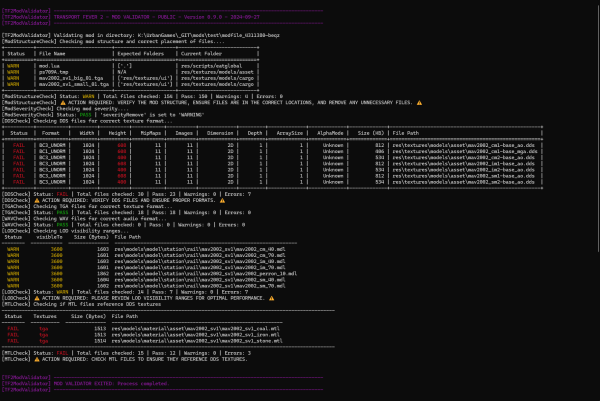
The mod validator tool was created in order to make the life of modders easier. This tool gives modders a quick overview of the status of a mod regarding most of the required changes for consoles and is able to show you some of the most common mistakes and flag them right away for faster fixing.
Please note that the mod validator tool is still being developed and not in a final state.
For more information regarding console modding check out the wiki subpage.
What can the mod validator tool check?
- Mod structure: Checks mod structure and correct placement of files.
- Mod severity: Checks if mod severityRemove is set to proper value.
- DDS textures: Check for the correct texture format.
- DDS mipmap fixer: fix mipmaps to generate required mipmaps in DDS files.
- TGA textures: Check for the correct texture format.
- WAV files: Check for the correct audio format.
- MTL files: Checks if material files refer to DDS textures.
How to use the tool?
The easiest way to use the tool is by dragging and dropping your mod folder onto the executable file. This will automatically initiate the validation checks for your mod.
Alternatively, you can run the tool manually via the command line. To do this, follow these steps:
- Open your command line interface (Terminal, Command Prompt, etc.).
- Navigate to the directory where the executable is located.
- Execute the tool by typing the following command:
./TF2_ModValidator_Public.exe <path_to_mod_folder>
Replace <path_to_mod_folder> with the actual path to your mod folder.
Validator tool download
Version 0.11.0 of the mod validator tool can be downloaded here - Please note that the mod validator tool is still being developed and not in a final state
Version 0.11.0 (18.11.2024):
- Mod size: Added check for maximum allowed mod size.
- Improved warning and failure descriptions: Output folder for failure “Unexpected file detected”.
- Unicode characters: Fixed validator crash with some unicode characters.
Version 0.10.0 (17.10.2024):
- HTML summary generation: Added generation of summary HTML page.
- Improved warning and failure descriptions: Added warnings and failures descriptions for better user guidance.
- DDS mipmap fixer: Added option –fix-mipmaps to generate required mipmaps in DDS files. This is an experimental feature. Warning: This option does overwrite existing files.
- Mod structure whitelist: Added `modio_preview.png` to the whitelist.
Version 0.9.0 (27.09.2024):
- Initial public release of the TF2 Mod Validator tool.